Raster to vector, magically

Turn your images into clean vector art like magic.

Vector Magic automatically converts JPG, PNG, GIF bitmaps to PDF, SVG, EPS vectors. Quickly get your artwork ready to print, embroider, cut, and more with the world's best full-color auto-tracer!

Vectorize Image
Drag & drop an image here or paste one with Ctrl + V

JPG, PNG, BMP, and GIF images up to 1 megapixel

No images starting with 'app.regenerativemagic.com' found. Clear Search

Stunning results for any kind of image

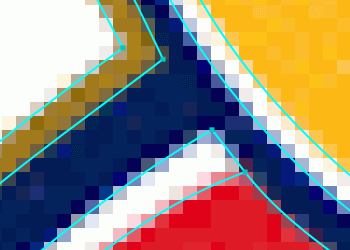
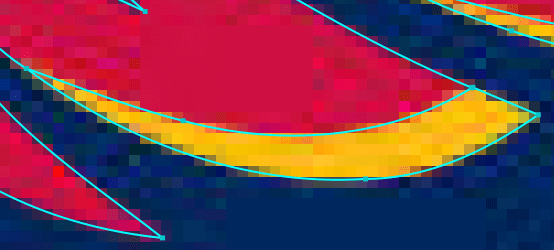
Each pair below is a published example: the original pixels on the left, the vector result on the right, zoomed in so you can see the edges.

Explore more examples

How to convert JPG, PNG, GIF images to PDF, SVG, EPS vectors

  1. JPG, PNG, BMP or GIF bitmap original uploaded for vector conversion

    1. Upload

    Upload a raster image and we automatically figure out what settings to use and trace the image for you.

  2. Outline of the vector result overlaid on the bitmap original for comparison

    2. Review & edit

    You can review the vector result, tweak the settings and even edit the result, all within the same tool.

  3. SVG, PDF, EPS, AI and DXF vector result ready for use

    3. Download

    The result is delivered in SVG, EPS, and PDF formats. The desktop edition also produces AI and DXF.

Simply the best auto-tracer in the world

Vector Magic re-captures the fine details of your original and provides sub-pixel precision.

Sub-pixel precision

Vector Magic carefully traces out every bit of information available in your image, slicing each edge pixel at precisely the right spot to re-create the intention of your original.

Vector Magic uses the appropriate number of nodes to represent your vector shapes.

The right number of nodes

Vector Magic is a breath of fresh air, intelligently selecting the right number of nodes to use, and placing them at excellent locations.

Tracing an image with Vector Magic produces a clean and crisp result.
Tracing
Embedding a bitmap image in a vector format doesn't give you the full benefits of a vector result.
Embedding

Tracing not embedding

Vector Magic always traces your bitmap, carefully teasing out the underlying shapes in it, and provides you with a real vector image with all of its benefits.

Fully automatic vectorization

Vector Magic analyzes your image and automatically detects appropriate settings to vectorize it with, and then goes ahead and traces out the underlying shapes in full color. This makes getting started a real breeze: just upload your image and presto, a result to review!

Read the full tutorial

Edit the result

You can eliminate unwanted shapes, connect shapes that have been separated, fix broken lines, and separate shapes that should not be touching, all in the form of an easy-to-use pixel-style editor.

Watch a video showing how to edit the result

Bitmap images vs vector images

What's the difference between JPG, PNG, GIF images and SVG, EPS, PDF, AI, DXF files?

Vector images consist of shapes like circles, rectangles, lines and curves, while bitmap images, also known as raster images, consist of a grid of pixels. Vectorization or tracing is the process of taking a bitmap image and re-drawing it as a vector image.

The shapes in vector images allow computers to do things that cannot be done with raster images, like scale them to any size without loss of quality and using them to e.g. cut, sew, paint, and laser engrave.

Learn more about vector images
Original800%
Vector Magic800%

PNG to SVG

Turn PNG logos, icons and graphics into SVG vectors that stay crisp at any size.

  • Flat colors and sharp edges trace into clean shapes with few nodes.
  • The colors are picked automatically, and you can reduce them or choose an exact palette.
  • Transparency is preserved in SVG and PDF output.
Read the artwork and logos tutorial

JPG to SVG

Turn JPG photos, scans and artwork into SVG vectors, free of compression noise.

  • Vector Magic traces the shapes beneath the JPG artifacts, so edges come out clean.
  • A lower detail level rejects more noise; a higher one keeps finer detail.
  • Photos become shape-based artwork with as many or as few colors as you choose.
Read the photos tutorial

Great for

Logos

Your logo represents your brand and is used across a wide range of media: your website, business cards, flyers, banners, etc. Ensure a consistent and crisp display in all contexts by having it in vector format.

Pre-print

Need to get artwork ready to print, cut, or embroider? Vector Magic can help you tame your image flow. Speed up turnaround times, minimize pre-print hassles, and lower your costs!

Graphic design

Quickly get bitmap source material into your vector compositions, opening up a range of creative possibilities. Or go old-school and draw something on paper, then scan, vectorize, and refine your creation.

... and more

Create an artistic effect from your photos, vectorize graphs or maps, turn scanned artwork into something more flexible, and much more. Try it out today!

I love your service - made the headaches with artwork go away in my business

S. Bick, President, Advantage Golf

Vector Magic requires the least amount of time for clean up and has the best interface. It's my preferred tracer

W. Wainwright, Art Director, Fox Screen Print

I wish I'd known about you long ago - it would have saved me so many headaches

Melanie, ALG Graphics

All I can say is WOW! Should have had this a long time ago. Edges come out sharp and clean. Thanks for a great product.

G Fuller, Owner, KEveryware Embroidery and Screenprinting

Become a vectorization expert

Vector Magic can convert JPG, PNG, BMP, GIF images to any of EPS, SVG, PDF, AI, or DXF

JPGPNGBMPGIF
SVGEPSPDFAIDXF

AI and DXF require the Desktop Edition

Help is only a click away

Officially supported input file formats are: JPG, PNG, BMP, and GIF bitmap images using the sRGB color space. That said, we do our best to accept any image format your browser can read. CMYK input gets converted to sRGB.

The maximum allowed image size is 1 megapixel, regardless of aspect ratio. Images larger than the size limit will be shrunk to that size. Note that this is pixels, not bytes, and there is currently no image byte size limitation.

Officially supported browsers are the latest versions of Chrome, Firefox, and Microsoft Edge running on modern desktops and laptops, though other modern browsers may also work.

Ready to vectorize your own images?

Need to remove the background from images, e.g. for your web shop? Try Clipping Magic »

Pre-Crop

Your image size exceeds the size limit. For best results, please crop the image to the portion you wish to vectorize.

Size Limit


Original Image

Size:
Aspect Ratio:
Megapixels:

Cropped Image

Size:
Aspect Ratio:
Megapixels:
Cropped image exceeds size limit and will be scaled to fit.
Size limit met, full resolution preserved.